Music (Team Walk-Up Songs)
You can access the area to add Team Songs in the TEAMS setup area. Click on any team, and then scroll down to "Team Songs", and click to expand. Then click the ADD A SONG button.
FanDraft offers two ways to import team songs:
- Apple Music
- Hosted MP3 Files
APPLE MUSIC
A subscription to the Apple Music service is required for this feature.
First step
You can add up to 3 song tracks for each owner. To do this, go to the TEAMS tab and click the ADD SONG button.
Second step
You will be required to authorize your Apple Music subscription, after which you may add songs for each team.
Third step
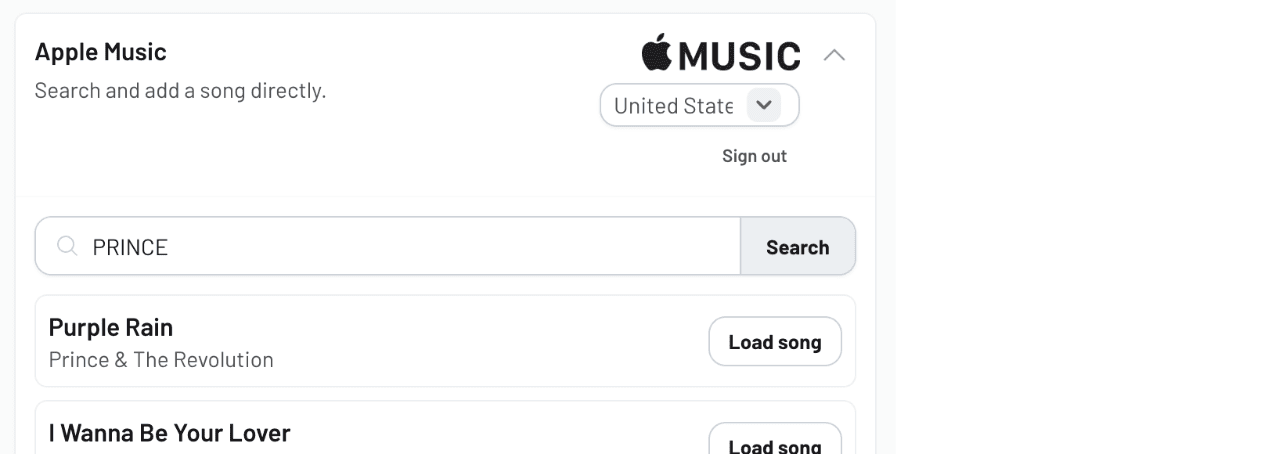
Type in the artist's name and then click the "Search Apple Music" button.
A list of songs will appear, after which you can click "Load song" and then "Choose this song" to add it.
HOSTED MP3 FILES
FanDraft allows the use of hosted MP3 files for the "Team Songs" feature. The "Team Songs" act as walk-up songs for each team, and will play when a team is on deck to draft or nominate a player in a draft.
The supported platform for hosting these songs is:
-
Dropbox
Dropbox offers a basic FREE account that you can sign up for here.
Below is an instructional video for how to use this platform with the FanDraft "Team Songs" feature. For step-by-step text instructions, click here.
Watch the walkthrough video: https://player.vimeo.com/video/426421465/