Teams
The "Teams" area is where you will set up and edit all of the teams in your league, as well as INVITE owners who will be participating remotely. The commissioner has full control over setting up all of the information about each team and owner.
Team Logo
Click on the team logo image to import a custom logo image.
Image files can be GIF, JPG, or PNG format, and must be 2 MB or less. It is recommended to use an image with proportional dimensions (e.g., 500x500, 400x400, etc.). A transparent 400x400 PNG is the recommended file type.
Team Name
Enter the team's fantasy name here.
Text-To-Speech Name
This value is used by the "Voice Announcer" when reading the team's name during the draft. Enter the phonetic value to improve how the announcer pronounces the team's name.
Short Name (7 characters max)
This is an abbreviation of the team name that will be displayed in the header of the draft board for readability purposes. Best practice is to use a shortened version of the team's nickname or the owner's first name.
There is a maximum of 7 characters for this field.
Auction $ to Start (Auction Only)
Here you can customize how many bid dollars an individual team starts with.
AUTO-DRAFT (Non-Auction Drafts only)
If you have an owner who will be unable to participate in the draft, you can utilize the AUTO-DRAFT feature to have FanDraft automatically draft for this team. The auto-draft will select players for this team based on player rankings and positional need (based on roster rules).
Auto-draft is NOT available for Auction style drafts.
Pre-Draft Notes
This area is for use in the PREDRAFT PRESENTATION, which is traditionally run prior to the beginning of the draft. Any notes you compile here will be displayed in the PreDraft area.
Additional PreDraft Information (Optional)
This area is primarily used for the PREDRAFT PRESENTATION, which is traditionally run prior to the beginning of the draft. When populated, these optional fields will be displayed on a team's respective PreDraft slide, as per the image sample below:
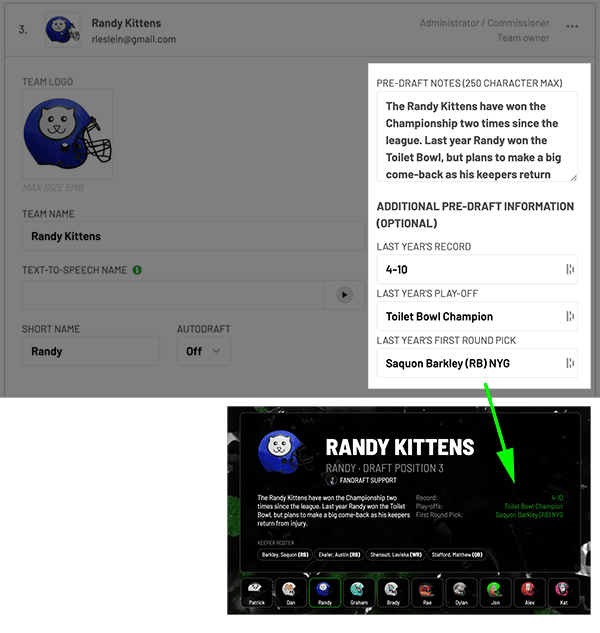
This information will also display during a draft (Traditional Style only), with small info boxes that pop up during the draft.
Add a Song (Team Walk-Up Song)
To add walk-up songs, go to the TEAMS setup area, and select a team. Then click the box that says "Team Songs"
The team song is played when an owner is on-deck to make a draft pick (or after a bid is won in auction style drafts). There are two different methods you can use for importing Team Songs.
- Hosted MP3: Click here to learn more.
- Apple Music: FanDraft currently integrates with the Apple Music streaming service. A subscription to the Apple Music service is required for this feature.
To add a Hosted MP3 song,Click here for instructions
To Add an Apple Music Song
- Go to the TEAMS setup area.
- Click on a team.
- Click and expand the "Team Songs" area.
- Login and authenticate your Apple Music account
- Click the ADD A SONG button
- Type a song name or artist into the Search area.
- Click "Load song" for the song you want to add.
- Click the gree "ADD SONG" button.
If you are having trouble authenticating your Apple Music account, the issue is usually a result of not having an active Apple Music streaming service subscription. Make sure you are paid and active Apple Music subscription if you run into this issue.
Owner Name
Enter the full name of the team owner.
Note: "Owner Name" only displays when a team's owner is not remotely drafting. If the owner is participating in the draft remotely, they assume ownership of this value.
Owner Email
This is only for use when an owner will be drafting remotely. The field will be used to send an invite to an owner's email to join your league (learn more).
Save Team
Make sure to click the green "SAVE TEAM" button to save any changes you made to a team.
Save Team & Invite Owner
An email will be sent to the owner to join the league. That owner can click the link in the invite email, and join the league for free. This owner will then be able to log in and join your draft remotely once you begin.
Revoke Owner
If you have invited an owner and they have joined your league, you can use the yellow "Revoke Owner" link to remove the owner's access to your league. Once revoked, you will be able to set up a new email and owner to invite.
Is Commish / Not Commish
You can utilize this dropdown to assign Co-Commissioner access to additional teams in your draft.
Co-Commissioners only have access to assist DURING the draft (in the Draft Room). They do not have access to edit the league settings. If you are a co-commissioner and would like full Admin control over a draft, you would have to purchase your own PRO account and create your own league.
Claims Team

FanDraft automatically assigns the Admin (person who purchased FanDraft) as an owner of a team in all drafts. However, if you don't want to own a team in your draft, this tool can be used to remove yourself as an owner. When you perform this, you will continue to have Commissioner access to the draft; you simply won't have a team. You will see the yellow "Unclaim Team" link next to the "Is Commish" drop-down when you own a team.
If you "Unclaim" a team as an Admin (person who purchased FanDraft), you will then see a "Claim Team" link available on all teams, allowing you to switch to a team that you own.