Auction Draft: Commissioner Controls Key
Commissioner Controls
The commissioner has full control of the draft at all times. This means, as a commissioner, you can make picks on behalf of other users, edit picks, pause/play the clock, and perform nearly any function on behalf of you, the league, and any owner. Below is an explanation key of all of the available controls.
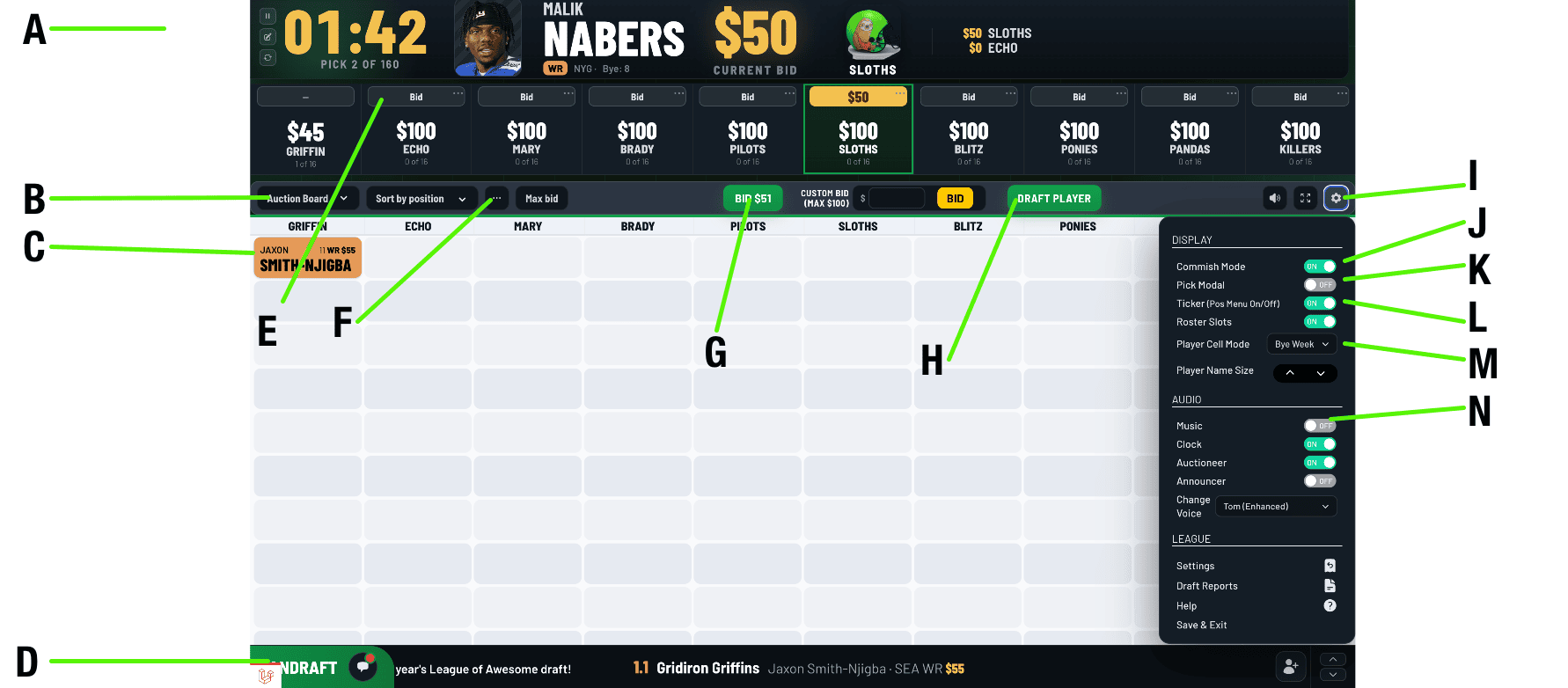
A) Auction Clock
Details about how the clock works in an auction draft can be found in the "Auction Process" section above. The Commissioner can access the clock controls in this area to pause/continue, edit, or reset the clock.
B) Draft Board Display
Use this drop-down menu to change which Draft Board display you would like to view.
C) Player Cell
Players will be displayed in the draft grid as they are selected.
D) Chat Window
Clicking on this box will reveal the Chat Window, allowing remote owners to text-chat with each other.
E) Bid
When in Commissioner Mode: The admin user can bid on behalf of other users by clicking here.
F) Draft Tools
Clicking on the (...) will open up the Draft Tools menu, where tools such as "Undo Pick", "Edit Picks", "Change Nominating Team", and "In-Draft Trades" are available for the commissioner to use at any point during the draft.
G) Bid $X
This green button will allow the Admin/Commissioner to bid on behalf of their own team. This is the same button individual owners will see to submit their bids during an auction. It only appears once a player has been nominated.
H) Draft Player
When in Commissioner Mode: While a player is being bid on, the commissioner can at any time click the "Draft Player" button to process the draft selection immediately.
I) Options Menu
Opens up the available display and audio options, and menu to exit the draft.
J) Commissioner Mode
Available to the Commissioner. Once turned on, this allows the commissioner to control and add draft picks on behalf of all of the owners. Whether or not you are in Commish Mode, remote users will still be able to make bids.
K) Pick Announcements
This turns on/off the display of the graphical "Pick Announcement" display that is shown after each draft selection.
L) News Crawl
Turn the draft ticker on the bottom of the screen on/off.
M) Player Cell Mode
This switches between displaying a player's BYE WEEK, TEAM NAME, or $BID AMOUNT in the individual player cells on the draft board.
N) Music (on/off)
Available only to the commissioner, if the league has team songs set up, this turns the music on or off.
Audio Menu

The audio menu will give the Commissioner access to various Sound FX and Voice Reactions that can be triggered anytime by the Admin user.
Change Nominating Team

If you would like to change the nominating team, you can do so by selecting the "Change to Team" option from the (...) drop-down.
Automatic Tracking
FanDraft automatically tracks bid dollars, roster slots, and whose turn it is to nominate.
- Tracks and displays all individual owner's “Bid Dollars” and “Maximum Bid”.
- Automatically skips nominating teams once their roster is full, or they have run out of bidding dollars.
- Tracks roster slots, so teams don’t nominate or bid on a position that is already full for them.